Open topic with navigation
Reviewing Applications
Reviewing applications is the second stage of the Volunteer Pipeline. It is typically handled by an assimilation pastor or a volunteer coordinator and the purpose is to make sure people have selected jobs that do not conflict and are aligned with the applicant's giftedness.
During the review process, volunteer opportunities can be dropped if they do not match or conflict with another volunteer assignment.
To review applications
- Click People > Volunteer Pipeline > Review Applications. The Review Applications queue appears.
- Select the volunteer application to work with from the Application drop-down.
- Optionally, select a specific job to work with from the Opportunity drop-down list. Alternatively, you can select Show All to see all jobs.
- Review the submitted applications making note of applicants who have selected more than one job opportunity. If necessary, you may need to contact the person and get a better sense of which job would more closely fit the person's giftedness.
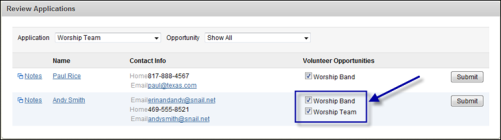
- Optionally, clear the check box beside any jobs that are no longer desired.
- Optionally, click the Notes link beside a person's name to record any notes related to the application. These notes are only available through the Volunteer Pipeline and will only be available through reports after the volunteer has completed the Pipeline.
- Click Submit. The applicant has now moved to stage 3 of the Pipeline: Ministry Review.